Citations of scientific articles are an important indicator for evaluating the scientific activity of a researcher. The Google Scholar platform provides information on how many times a researcher's work has been cited by other researchers, which makes it possible to track the impact of his or her work on the scientific community. However, sometimes citation data is not displayed in a scholar's profile, which can lead to misleading information. In this article, we will explain how to merge a publication with its citations so that the data is displayed correctly.
We used random articles from Google Scholar as examples in our material.

Google Scholar is not only a search engine, but also an important resource for tracking citations of scientific publications. The platform makes it easy to see how many times a particular paper has been cited, as well as a list of publications that cite it. In addition, Google Scholar provides information about the versions of articles and similar works, as well as displays data about the author, adding all his publications to his personal profile. The number of citations is listed under each article, allowing researchers to track the impact of their work on the scientific community.
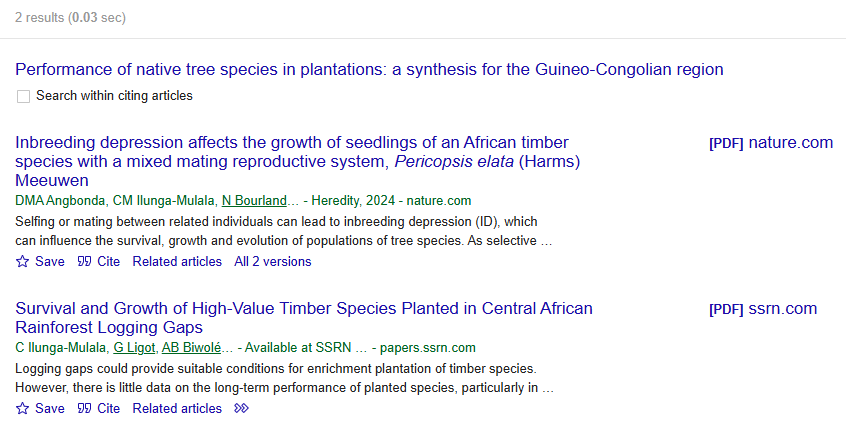
So, for example, if an article has been cited by other researchers, it will indicate at the bottom how many times it has been cited in scientific papers. For details, you can click on the ‘Cited by X’ link, which will provide a list of these publications. For example, the article shown in the screenshot below has been cited twice.

If we click on the "Cited in 2 sources" button, we will see the scientific works that mention this article, and we can read more about them.
How to merge an article with citations in Google Scholar?
Sometimes it happens that despite active mentioning of an article in other scientific papers, information about its citations is not displayed in the researcher's profile. This may be due to the fact that the publication and its citations are registered in different records. In such cases, it is necessary to manually merge the article with its citations to display the data correctly.

In order to simplify this process, we have prepared a step-by-step instruction that explains in detail how to solve this problem.
Step 1: Search for an article with citations
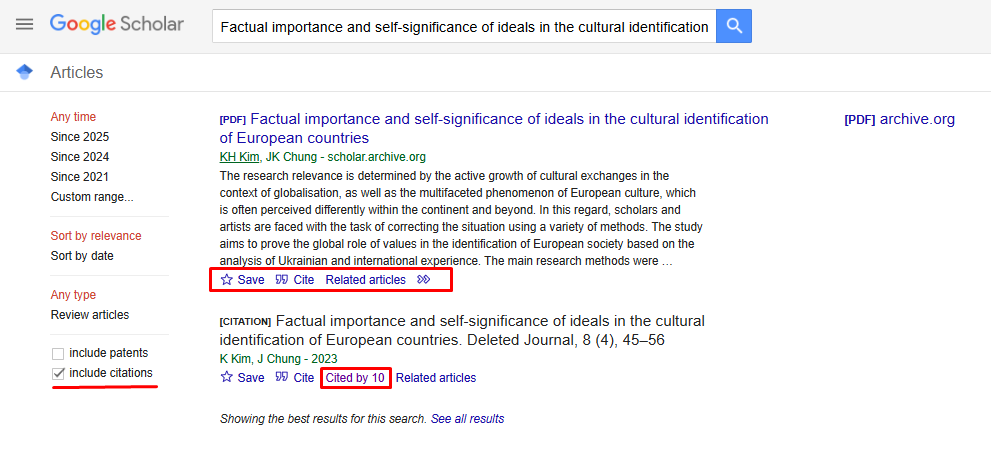
When searching for an article in Google Scholar, make sure the "Include citations" option is selected in the left panel to include citations in your search. The results can include the article itself, or a separate record of its citations that shows the number of times it has been cited.
For example, the screenshot below shows an example: the search engine produced two results. The first one is a link to a scientific article in PDF format, and the second one is a separate citation record showing how many times the main article has been cited in other publications.
Step 2: Add the article to your profile
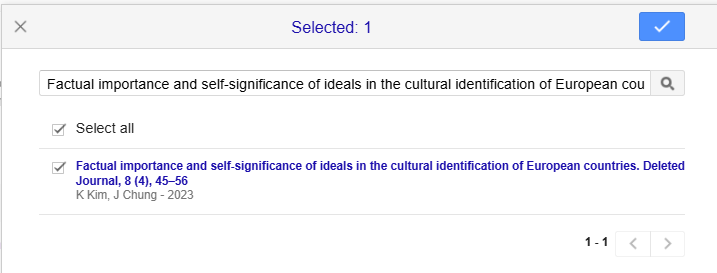
Once you have completed your search, go to your profile on Google Scholar and click "Add article".

After that, a window will open in front of you, in the search box of which you should enter the full name of the citation record of the main article (the second search result). In our case, it is "Factual importance and self-significance of ideals in the cultural identification of European countries. Deleted Journal, 8 (4), 45-56". Note that you must insert the full title, including "Deleted Journal, 8 (4), 45-56". Complete this action by clicking the blue tick in the top right-hand corner.
Step 3: Merge the records
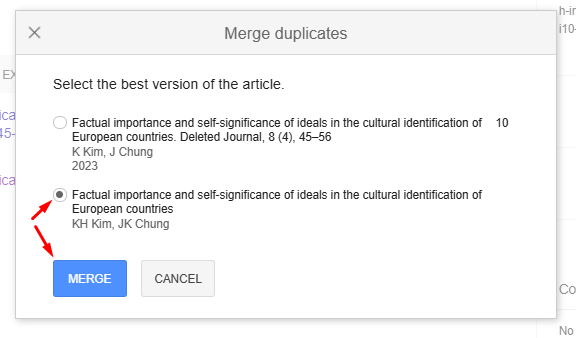
When the article and its citation are found, you need to merge them into one record. To do this, tick both entries and select the "Merge" option.

Then a window will appear on the screen where you need to select the correct publication. Make sure to choose the main version of the article, not the citation record, and click "Merge."
Step 4: Complete the process
After merging, a single entry will appear in the scholar's profile, including citation data. All future mentions of this article will be automatically added to the profile.

Merging an article with its citations in Google Scholar is an important step that contributes to the correct evaluation of a researcher's scholarly activity. It helps to avoid errors in citation counting and increases the accuracy of scientometric indicators. By following our step-by-step instructions, you can easily correct any errors and ensure your profile is set up correctly.
"Scientific Publications" is ready to help you increase your citation and Hirsch index in Google Scholar. Our experts will provide you with a free consultation and help you develop a strategy to improve your scholarly metrics. Fill out the form below and our manager will contact you as soon as possible. Together to new scientific achievements!